Phone Clone - Data Transfer
Excellio TechLibraries & Demo
3.812.00 Reviews
- Version
- 2.4.0
- Installs
- 100.00K
- Age Rating
- Everyone
Screenshots
Our Review of Phone Clone - Data Transfer
 Analysis by Appyee
Ever had that moment of dread when you get a shiny new phone, but the thought of transferring all your data from the old one seems more like a Herculean task than a simple chore? Well, I feel you. Enter Phone Clone - Data Transfer, the app that promises to make this process as easy as pie. I took it for a spin, and here's how it went down.
That switch is often less about moving every file than making sure the essentials are ready when you need them. I would treat Phone Clone as a practical helper for that handover, not as a guarantee that two phones will become exact copies. Before starting, I’d check that both devices have enough battery, keep them close together, and decide which items really need to come across. A little planning can prevent the transfer from becoming a long session of moving things you later delete.
What the free access means
Phone Clone is a free app from Excellio Tech, in the Libraries & Demo category. Its age rating is Everyone, so its basic audience is broad. There are in-app purchases listed from $1.99 to $29.99 per item, but I would separate that from the cost of getting started: downloading and trying the app is free. The existence of optional purchases alone does not tell me which tasks require payment, so I would check the purchase screen carefully before agreeing to anything.
That distinction matters when comparing it with a phone maker’s built-in migration tool or a cloud backup. Those options may already be available to you, while this app gives you another route to consider. I wouldn’t pay for an item just because I’m in the middle of a stressful phone setup; I’d first confirm what it unlocks and whether the same transfer can be handled through a free system tool.
Getting Started with Phone Clone
First things first, downloading and setting up Phone Clone - Data Transfer was a breeze. Available on both Android and iOS, it’s just a quick hop to the app store, and you’re ready to rock. The app is lightweight, so no massive storage space required, which is always a win in my book. Once installed, it's all about connecting your devices.
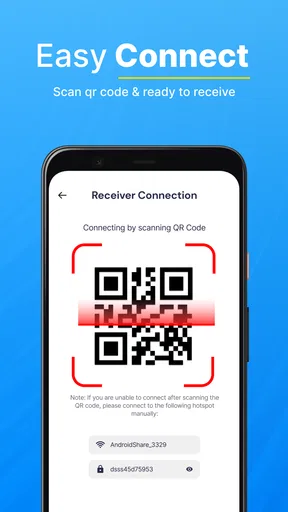
The app uses a QR code to link your old and new phones, which is a nifty little feature, making the whole process feel quite futuristic. Just scan the code with your new phone, and voila, the connection is established. No fumbling around with settings or cables, just a seamless link-up.
For a smoother attempt, I’d put both phones on a stable surface and avoid walking away while they connect. If the QR scan doesn’t work straight away, I’d check that the code is visible, the camera can focus, and the two devices are still near each other before restarting the process. These small checks are more useful than repeatedly tapping through setup screens, especially when you’re already juggling a new handset and its initial settings.
The Transfer Process
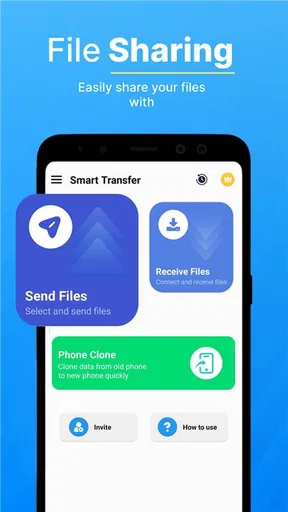
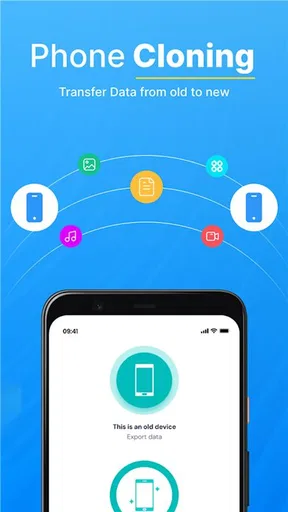
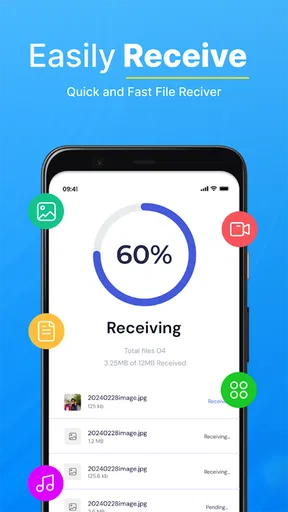
Let’s dive into the nitty-gritty of what Phone Clone promises – the actual data transfer. You can move your contacts, messages, photos, and even apps. I gave it a test with a hefty load of photos and videos, and the transfer speed was impressive. We're talking minutes, not hours. The app supports both Wi-Fi and mobile data, so if you're out and about, you're not stuck waiting for a Wi-Fi connection.
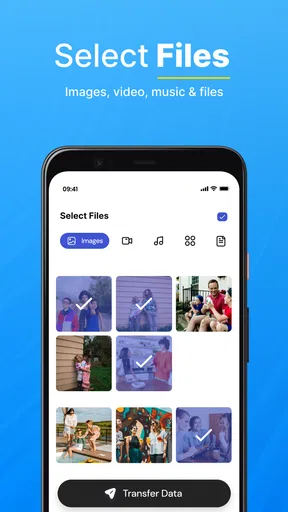
One feature I found particularly handy was the ability to select specific items to transfer. If you’re like me and have a bunch of random screenshots or memes you don’t necessarily need on your new device, you can choose to leave those behind. It’s a great way to start fresh with only the essentials.
That selective approach is useful beyond tidying a photo gallery. I’d use it to move work contacts and current conversations while leaving old downloads behind, or to bring over camera pictures without filling a new phone with every duplicate screenshot. A good rule is to make the old device the source of truth until you’ve checked the new one: open a few transferred photos, verify important contacts, and confirm that the conversations you care about are present before wiping or trading in the original phone.
There’s also a trade-off between convenience and completeness. A direct transfer can save time compared with manually copying files, but it should not be treated as a backup. If a particular item is irreplaceable, keep another copy somewhere you control before beginning. This is especially sensible for photos, documents, or messages that matter for work or family; a migration session is the wrong moment to discover that the only copy was on the handset you’re about to reset.
User Experience
The user interface is straightforward and user-friendly. Even if you’re not tech-savvy, the app guides you through each step with clear instructions and helpful prompts. I appreciated how intuitive it felt, like having a friend walk you through the process. Plus, the app doesn’t bombard you with ads, which is a huge plus in today’s ad-heavy app world.
One thing to note, though, is that the app works best when both phones are from the same platform, either Android or iOS. Cross-platform transfers are still possible, but they might require a bit more patience and a few extra steps.
That platform difference is where I’d set realistic expectations. Moving between two phones on the same system is usually the simpler case; switching from Android to iPhone or the other way around can involve different setup flows and different ways of handling apps or account data. Even if a transfer tool moves selected content, it doesn’t mean every app will carry its login, settings, or locally stored information with it. I’d plan to sign in again where needed and keep the old phone available until the new one feels complete.
Where it fits among transfer options
For an everyday move, imagine replacing a phone before a busy week. You want your contacts, recent messages, and favorite photos on the new device before heading out, but you don’t want to spend the evening sorting through every old screenshot. A QR-based connection and selective transfer can make that job feel more manageable than sending files one by one. I’d start with the content I need immediately, then handle less urgent items after checking the new phone.
The usual alternatives each have a place. A manufacturer’s migration tool can be a natural first choice when both phones are from that maker, while a built-in operating-system transfer may be more convenient when it directly supports the change you’re making. Cloud backup is better when you want an off-device copy that can be restored later, but it depends on having a backup ready and may involve a longer download. Phone Clone’s appeal is the direct, guided handoff; its limitation is that it remains a transfer step rather than a complete long-term backup plan.
If you are moving to a phone with less free storage, selection becomes more than a housekeeping feature. I’d prioritize contacts and essential media first, then leave bulky videos or old folders until I know what space is available. Conversely, if you have ample room and want continuity, selecting too narrowly can mean returning to the old phone later for something you forgot. A quick review of the categories before confirming is a worthwhile middle ground.
Who gets the most value
I can see this being most useful for someone who wants guided help and prefers choosing what moves instead of blindly copying everything. It also suits people who are comfortable keeping both devices on hand during setup and checking the result before retiring the old one. The app has a 3.8 average from around 2.1 thousand ratings, with over 100 thousand installs, so there is a real audience for this kind of tool, though those figures are context rather than a promise that every phone pairing will behave the same way.
I’d be more cautious if you need a fully hands-off migration, have a complicated cross-platform move, or cannot afford to spend time checking what arrived. In those cases, the phone maker’s own instructions or a carefully prepared cloud backup may be a better fit. The current version is 2.3.8 and the minimum operating system is 10; before relying on it, I’d check that the devices you plan to use meet that requirement and that the app is available for the relevant phones.
A common practical question is whether you can keep using the old phone during the process. I’d avoid changing or deleting important content on either device until the transfer is finished and checked. Another is whether every app will be ready to use afterward: I would expect to review apps individually and sign in again where necessary, rather than assume that moving an app also moves its account access or all of its data.
Final Thoughts
So, is Phone Clone - Data Transfer worth your time? In my experience, absolutely. It's efficient, easy to use, and does exactly what it promises. For anyone switching devices and dreading the data transfer process, this app can be a real lifesaver. It takes the stress out of moving your digital life from one phone to another, and that’s something we all could use more of.
Overall, Phone Clone - Data Transfer gets a thumbs up from me. Whether you're a tech newbie or a seasoned pro, this app makes the transition to a new phone as smooth and painless as possible. So next time you’re eyeing that new device, rest easy knowing this app has got your back.
My recommendation is to try the free access when its guided, selective approach matches your move, and to keep expectations grounded about what a phone-to-phone transfer can do. I’d compare any optional purchase with the built-in choices on both devices before spending, and I’d keep a separate backup of anything irreplaceable. With that preparation, it can be a useful way to reduce the chore of changing phones; without it, a direct transfer can still leave follow-up work that no quick connection can remove.
Verdict
Strengths of Phone Clone - Data Transfer
- Quick transfer speeds for large files.
- User-friendly interface for all ages.
- Supports multiple data types seamlessly.
- No internet connection required for transfer.
- Compatible with both Android and iOS devices.
Limitations of Phone Clone - Data Transfer
- Limited support for older phone models.
- Occasional connection drops during transfer.
- Lacks advanced customization options.
- May require additional permissions.
- Incompatible with some third-party apps.
Similar Picks in This Category
View All
PGT: GFX, Launcher & Optimizer
Trilokia Inc.4.5

AusweisApp Bund
Governikus Service GmbH3.7

Cardboard
Google LLC3.2

Gamers GLTool with Game Tuner
Trilokia Inc.4.5

Multi Web Chat - Read Secretly
World Scan & Cleaner3.8

App Cloner Premium & Add-ons
App Listo1.9
Frequently Asked Questions
What is Phone Clone - Data Transfer used for?
Phone Clone - Data Transfer is an application designed to help users seamlessly transfer data from one smartphone to another. It supports a variety of data types including contacts, messages, photos, videos, and apps. This is particularly useful when upgrading to a new phone, ensuring that all important data is moved efficiently and securely.
Is Phone Clone - Data Transfer compatible with all smartphone models?
Phone Clone - Data Transfer is compatible with most Android and iOS devices. However, users should ensure that both the source and target devices meet the app's minimum system requirements to avoid any compatibility issues. It's always a good idea to check the app's listing for the latest compatibility updates and requirements.
How does Phone Clone - Data Transfer ensure data security during the transfer process?
Phone Clone - Data Transfer prioritizes user privacy and data security by utilizing an encrypted, peer-to-peer connection. This means that data is transferred directly between devices without passing through a third-party server, minimizing the risk of data breaches or unauthorized access during the transfer process.
Are there any costs associated with using Phone Clone - Data Transfer?
Phone Clone - Data Transfer is generally free to download and use for basic data transfer needs. However, some advanced features or additional services may require in-app purchases. It's advisable to review the app's pricing details on the download page to understand any potential costs involved.
What types of data can be transferred using Phone Clone - Data Transfer?
Phone Clone - Data Transfer allows users to move a wide range of data types, including contacts, SMS, call logs, photos, videos, and apps. This comprehensive range ensures that users can fully replicate their old phone's data onto a new device, making the transition smooth and hassle-free.
